Allbound workflow: one account from first source to CRM feedback
Quick answer
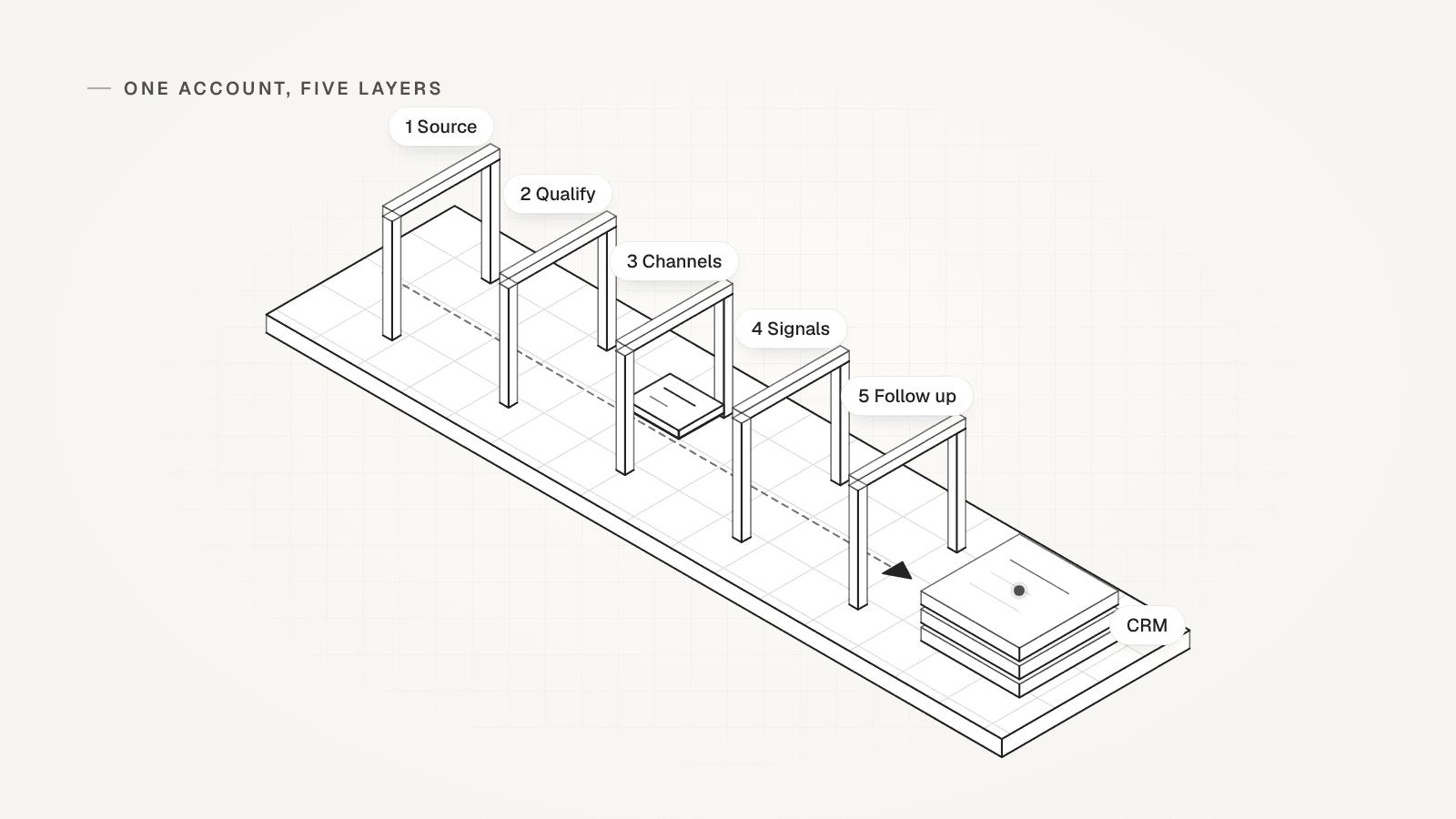
An allbound workflow runs inbound and outbound as one motion on the same accounts. It suits sales-led B2B (business-to-business) teams that run ads, outreach and founder posts. Its five layers: source accounts and merge duplicates, qualify, pick verified channels, capture every signal, and follow up. The last one logs every reply in your CRM, where contacts and deals live. Every layer writes to one row per account. Still running one motion? Start with inbound vs outbound.
 By Tim Scheuer, Co-founder of Oxygen · Updated October 29, 2026
What is an allbound workflow?
An allbound workflow runs inbound and outbound as one motion, aimed at the same accounts and tracked on one row per account. Tim Scheuer, OXYGEN's co-founder, calls allbound a strategy that combines inbound and outbound into one motion. His reason, in an October 2026 post: the cost to win a customer keeps climbing, so marketing and sales have to work in sync.
Run as two builds, the motions drift apart. Marketing runs ads and posts to one list, and sales runs sequences, planned series of messages, to another. Then it gets hard to see who owns a reply or which channel earned the deal. Still choosing between the two? Read inbound vs outbound first.
Sources: Tim Scheuer on LinkedIn: the five-layer go-to-market (GTM) post, October 2026
What are the five layers of an allbound workflow?
Source every account, qualify it, run three channels on the same people, capture every signal, then follow up and log it in the CRM.
ICP means ideal customer profile, the kind of company you sell to best. Here is each layer as the post states it; the table below adds how to run it.
- Source every account: pull accounts from several data tools, then "Dedupe them", which means merge the duplicates.
- Qualify: an agent "scores ICP fit with reasons". Then try one buyer role at a time: Demand Gen (demand generation) lead, VP Marketing, then CRO (chief revenue officer). Verify the email.
- Run three channels on the same people: ads on LinkedIn, Google and Meta, plus email, LinkedIn and calls in an OXYGEN sequence. The best weekly founder posts run as ads.
- Capture every signal in one place: replies, post engagers, profile viewers and DMs (direct messages), plus ad engagement through Fibbler.
- Follow up, then log it in the CRM: reach out to engagers and retarget them, showing them your ads again. Sync it all to the CRM, so you know which channel earned each deal.
Sources: Tim Scheuer on LinkedIn: the five-layer go-to-market (GTM) post, October 2026
The five-layer implementation table
One row per layer of the post, read left to right.

| Layer | Input | Rule or check | Field it writes | Owner | Failure path |
|---|---|---|---|---|---|
| 1. Source and dedupe | Accounts from every source and form | Merge on the company domain. Check the CRM for customers, open deals and do-not-contact. | account_identity | The list owner | No domain: find one or hold the row. Customer, open deal or do-not-contact: exclude. |
| 2. Qualify company and buyer | The merged row, your ICP page and your buyer roles in order | Fit with a reason. Buyer roles in a set order. Email waterfall (one provider after another), then verify. | qualification_reason | An AI column scores each row; a person checks borderline rows | No fit: hold. Wrong role: try the next. No buyer after the last role: hold. |
| 3. Pick verified channels | The buyer, the email verdict and the LinkedIn profile | Email steps need a valid address. LinkedIn steps need a profile. Ads target the same accounts. | channel_available, handoff_owner | One owner per account, often the SDR (sales development rep) running the sequence | No valid email: LinkedIn steps only. No email and no profile: hold. |
| 4. Capture every signal | Replies, DMs, reactions, profile views, follows, site visits, ad engagement | Log each signal with its date. Engagement is not buying intent. | reply_state | The account's owner | Nothing yet: leave it empty. Person not in the CRM: add the record first. |
| 5. Follow up and log | The reply or signal, the owner and the account's sources | Follow up on the channel they used. Log the reply, its source and the next step in the CRM. | next_action | The owner, then the account executive at a booked meeting | No reply after the last step: hold with a recheck date. Never log an outcome that did not happen. |
How does one account move through the five layers?
Layer by layer, each one fills its field on the same row. Illustrative: kestrel.example is a made-up account, and every fact about it is invented.

It sells software to companies and sits on your ad list. Its row after all five layers:
- account_identity: kestrel.example. Two sources, merged on the domain. CRM checked Oct 19: not a customer, no open deal, not on do-not-contact.
- qualification_reason: Fit. Sells software to companies, 220 staff, inside your size band (company page). No Demand Gen lead; VP Marketing found, the second role tried.
- channel_available: Email valid after the check, LinkedIn profile found. So the sequence runs email and LinkedIn steps, and the account stays on your ad list.
- handoff_owner: The SDR (sales development rep) for the region owns the sequence and the first reply. The account executive takes over once a meeting is booked.
- reply_state: Reacted to a founder post on day 4, logged as engagement, not intent. Replied on LinkedIn on day 9, labelled Interested.
- next_action: The reply stopped the sequence and moved their lead stage to engaged. The SDR offers two call times by Oct 30. With the meeting-booked rule armed, a call booked through Cal.com moves it to meeting.
What happens when the evidence is missing or conflicts?
The account goes on hold with its reason and a recheck date. Nobody fills the gap with a guessed fit, channel or reply. Hold when the fit fails or the last buyer role turns up nobody. Hold when two sources disagree, such as 40 staff on one and 400 on another, until one lookup settles it. A right buyer with no email is no hold: run LinkedIn steps only.

Illustrative again: ashgrove.example is a made-up software company that fits on size. The only marketing contact your sources return is a Marketing Coordinator, none of the three roles, and with no email. Its row:
- account_identity: ashgrove.example. One source. CRM checked Oct 28: no match.
- qualification_reason: Hold. The company fits, but none of the three roles was found, and no email is verified.
- channel_available: None. There is no buyer to contact yet.
- handoff_owner: The list owner, for the recheck only.
- reply_state: None. Nobody was contacted, so there is no reply to record.
- next_action: Hold until Jan 28, then search the three roles again, sooner if a new VP Marketing appears.
How do you source accounts and merge duplicates?
Pull every source into one table and merge duplicates on the company domain before anything paid runs. Our public GTM (go-to-market) Architecture Kit also starts with the merge. It turns lists and signals into one entry per company domain and keeps each source's signals. Paid company research comes next.
The post's sources overlap. BlitzAPI offers one B2B data API, a connection your own tools call, for companies, people, emails and phones. Prospeo finds verified work emails and mobile numbers. Ocean.io ranks companies against an ICP it learns from your won deals. AI Ark offers B2B data with an AI lookalike search, and Sales Navigator is LinkedIn's sales tool.
In OXYGEN, a table can merge duplicates after every write, before any paid column runs. The account_identity field then holds:
- The domain, the key your sources and CRM agree on. A row without one waits until a lookup finds it.
- The sources that returned it, so results split by source later.
- The CRM check and its date: customer, open deal, do-not-contact.
Sources: Tim Scheuer on LinkedIn: the five-layer go-to-market (GTM) post, October 2026, Public GTM Architecture Kit: source intake and the order of its functions, BlitzAPI: one B2B data API for GTM builders, Prospeo: verified emails and phone numbers, Ocean.io: ranks companies against your ICP, AI Ark: B2B data and lookalike search, LinkedIn: Sales Navigator
How do you qualify the company and the buyer?
Score fit with a written reason, look for buyers in a set order, then find and verify the email. The post's three rules are "No fit, hold the account", "Wrong persona, try the next role" and "No email, LinkedIn steps only". A persona is the buyer role you want to reach.
Our lead qualification workflow owns the rubric for this layer, with pass, fail or unknown for each check and seven worked rows. Copy its verdict and reason into qualification_reason. Keep the email verdict on the row too: the next layer reads it.
On OXYGEN's plan credits, an email finder bills when it finds an address, about $0.085. Each check costs about $0.00225 and bills even on a miss, including checks of guessed addresses on rows without a LinkedIn URL. When a lookup runs on your own account with a data provider, OXYGEN's platform fee applies even when nothing is found.
Sources: Tim Scheuer on LinkedIn: the five-layer go-to-market (GTM) post, October 2026
How do you run three channels on the same people?
Aim ads, the sequence and founder posts at the same account list, with one owner per account. The channel_available field records which steps each person can get. In OXYGEN the sequence reads the email column, not this field, so leave unverified addresses out of that column.
In OXYGEN, one sequence holds email, LinkedIn and call steps. A lead with a LinkedIn profile but no email skips the email steps, and a lead with no profile skips the LinkedIn ones. Call steps queue the lead for a person to dial in the web softphone, a phone in the browser, which is in beta.
Ads run in your own ad accounts: OXYGEN does not buy ads, and its Ads tool reads competitors' public ads. Founder posts can be scheduled in OXYGEN, each approved before it goes out.
You approve the launch, not each send. Start the sequence once with a cap on live sends, and leads enrolled later are contacted under that approval, within its limits. Turn on the company pause to keep one conversation per account. A reply in a category you pick then holds the replier's colleagues in that campaign until you resume them.
How do you capture every signal in one place?
Log each signal on the account it belongs to, with its date, so the owner reads one history before the next touch. In OXYGEN, sequence replies and LinkedIn and WhatsApp DMs land in one inbox, the Unibox. For LinkedIn, only conversations OXYGEN started sync until you turn on full inbox sync.
Profile views, new followers, post reactions and comments become signals on the person's CRM record. So do website visits from a visitor identification tool that OXYGEN support connects. LinkedIn signals need their capture switched on and land only on people who already have a CRM record. A website visit lands only once its automation is armed. A Post Engagers table fills rows but raises no signals.
Ad engagement is not one of OXYGEN's signal types. The post uses Fibbler for this. Fibbler says it identifies companies engaging with your ads and connects them to pipeline, your open deals, in CRMs such as HubSpot.
Write the latest state into reply_state, and keep engagement apart from replies. A reaction says someone saw you, not that they want to buy.
Sources: Tim Scheuer on LinkedIn: the five-layer go-to-market (GTM) post, October 2026, Fibbler: paid ads attribution
How do you log every reply in the CRM for attribution?
Let each reply update the CRM by itself, and carry the account's sources onto the deal. Do not rely on anyone to copy replies over by hand.
Attribution means knowing which source or channel gets credit for a deal. Set the deal's Source field, a choice of channels such as Cold Email or Post Engager. Add your data tools as choices or as a field of their own. Then you can split pipeline by where each account came from. HubSpot syncs both ways with OXYGEN, Attio one way into Attio, and Pipedrive imports one way into OXYGEN. There is no Salesforce sync.
In OXYGEN, a reply files the person in the CRM and can move their lead stage. Auto-replies and bounces are skipped. Neutral, Not now, Lost and Wrong person replies file the person without moving their stage, and stages only move forward. It switches on with your first live sequence:
- Interested: the lead stage becomes engaged.
- A meeting booked through a connected Cal.com: meeting, once you arm the separate meeting-booked rule. That one does not switch on with the sequence.
- Not interested, a clear no: disqualified.
- Stop or unsubscribe by email: unsubscribed, and the address goes on do-not-contact. On LinkedIn or WhatsApp, a no becomes disqualified. By default, any LinkedIn or WhatsApp reply also puts the person on do-not-contact.
Copy the account row and set it up in OXYGEN
Copy the blank account row
Fill one field as each layer runs, and leave the rest empty until then.
ACCOUNT ROW account_identity: [domain] | sources: [list] | CRM checked [date] qualification_reason: [fit or hold] because [proof, source] channel_available: email [valid/invalid/none] | LinkedIn [yes/no] | ads [yes/no] handoff_owner: [owner now] | then [who, when] reply_state: [none/engaged/replied: label] | [channel, date] next_action: [action, owner, date] or Hold until [date]: [recheck]Or use the six fields as table columns
Paste this header into a CSV file and import it as a table named accounts. The domain gets its own column because the next step merges on it.
domain,account_identity,qualification_reason,channel_available,handoff_owner,reply_state,next_actionMerge duplicates on the domain
After every write, rows that share a domain collapse into one before any paid column runs. Deleted rows stay in the row history.
oxygen tables auto-dedupe set accounts --on domain --normalize domain --keep most-complete --merge-values fill-empty --jsonFile each hold as a CRM task
Run the first line only if the CRM has no match: it adds the company, which can start automatic enrichment you turned on and spend credits. CRM, then Tasks, lists every open recheck.
oxygen crm assert companies --identity domain=<domain> --live --json oxygen crm tasks add companies <domain> "Recheck: <what is missing>" --due <date> --assignee <owner email> --jsonLaunch the sequence once, with a send cap
The preview sends nothing. Leads enrolled after the start are contacted under that approval, within its limits.
oxygen sequences preview <sequence> --json oxygen sequences start <sequence> --approved --max-live-sends <n> --jsonCheck that replies reach the CRM
The lead-stage router files each human reply in the CRM. It arms itself the first time a sequence goes live. The meeting-booked rule for Cal.com bookings does not arm itself: connect Cal.com, then arm it once.
oxygen crm automation rules --json
oxygen crm automation set crm-meeting-booked --armed --live --approved --max-credits 1
What OXYGEN does not do here
- It does not buy ads or send audiences to ad platforms, and ad engagement is not one of its signal types.
- No Salesforce sync. HubSpot syncs both ways, Attio one way into Attio, and Pipedrive imports one way into OXYGEN.
- Sending needs a paid plan, from $49 a month, and each LinkedIn account costs $34 a month.
Frequently asked questions
What is an allbound strategy?
It is a plan to run inbound and outbound as one motion. Marketing and sales aim at the same accounts, share one row per account and judge results on the same pipeline. Tim Scheuer's version has five layers, from sourcing accounts to logging every reply in the CRM.
How is allbound sales different from inbound-led outbound?
Inbound-led outbound is one move: reaching out first to people who already engaged. Allbound sales runs the whole loop on the same accounts, from ads and outreach to every reply in the CRM. Our guide to inbound vs outbound covers inbound-led outbound.
Who owns an account in an allbound workflow?
One person at a time, written in handoff_owner. Often the SDR who runs the sequence owns the first reply, and the account executive takes over at a booked meeting. When AI agents share the work, use our GTM agent handoff template.
What do you do with an account that has no verified email?
If the buyer fits, run LinkedIn steps only, as the post says. If no buyer fits after the last role, or there is no LinkedIn profile either, hold the account with a recheck date. Never guess an address.
Does every message need an approval?
No. In OXYGEN you approve a sequence launch once, with a cap on live sends. Leads enrolled later are contacted under that approval and within its limits.
Related
Sources
- Tim Scheuer on LinkedIn: the five-layer go-to-market (GTM) post, October 2026, checked October 29, 2026
- Public GTM Architecture Kit: source intake and the order of its functions, checked October 29, 2026
- BlitzAPI: one B2B data API for GTM builders, checked October 29, 2026
- Prospeo: verified emails and phone numbers, checked October 29, 2026
- Ocean.io: ranks companies against your ICP, checked October 29, 2026
- AI Ark: B2B data and lookalike search, checked October 29, 2026
- LinkedIn: Sales Navigator, checked October 29, 2026
- Fibbler: paid ads attribution, checked October 29, 2026
Updated October 29, 2026. OXYGEN's own prices and limits come from the product and its live price list. The other products named here are trademarks of their owners and are not affiliated with OXYGEN. Something out of date? Tell us.